PHP 8.4 on IIS FastCGI: install it without php-fpm myths
Install PHP 8.4 NTS on Windows, add IIS FastCGI and the handler, set a safe php.ini, verify phpinfo, and remove the lab page afterwards.
- Build
- 26100.33650
- Edition
- Standard / Datacenter
- Architecture
- x64
- Support
- Documentation (E1)
- Evidence
- E1Official documentation
- Verified
- 2026-10-29
- Test machine
- PHP 8.4.27 NTS + IIS FastCGI verified on VM 361 Windows 11 26H2; Server 2025 role/cmdlet E1
- Page type
- Task
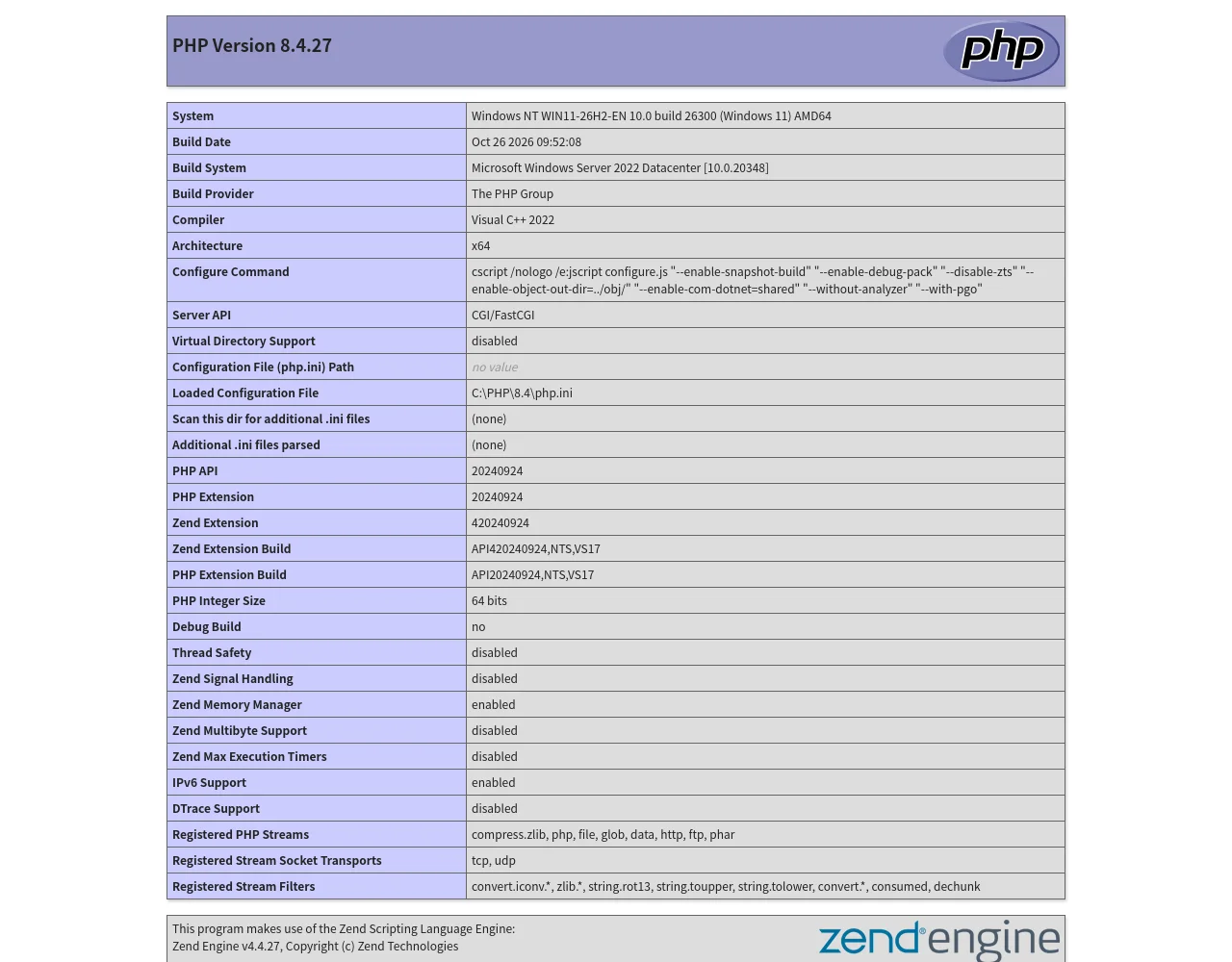
C:\PHP\8.4\php.ini. The host is Windows 11 26H2; Server 2025 role steps remain E1.The short answer
Section titled “The short answer”On Windows, PHP officially runs under FastCGI/CGI, not php-fpm. There is no official Windows php-fpm build to install.
The working stack is:
- IIS + CGI/FastCGI role service.
- PHP NTS Windows build + VC++ runtime.
php.iniwithfastcgi.impersonate=1,cgi.fix_pathinfo=0.- IIS FastCGI application +
*.phphandler. - A test page, then remove
phpinfo().
Install the IIS side
Section titled “Install the IIS side”Server 2025:
Install-WindowsFeature Web-CGIWindows client lab (what VM 361 used):
Enable-WindowsOptionalFeature -Online -FeatureName IIS-CGI -All -NoRestartRestart IIS (iisreset) or the W3SVC service if the handler does not appear.
Download PHP
Section titled “Download PHP”Use the NTS (Non-Thread Safe) zip for FastCGI. In this lab:
php-8.4.27-1-nts-Win32-vs17-x64.zip- extracted to
C:\PHP\8.4 php.exe -vreturnedPHP 8.4.27 (cli) (NTS Visual C++ 2022 x64)
Verify the SHA-256 against sha256sum.txt from the same download directory. Do not use a random “PHP for Windows” repack.
The PHP binaries need the Visual C++ 2015–2022 x64 Redistributable. Without it, php.exe exits with 0xC0000135 (missing DLL). Install it, then retest php.exe -v.
php.ini
Section titled “php.ini”Copy php.ini-development to php.ini and set at least:
fastcgi.impersonate=1cgi.fix_pathinfo=0date.timezone=UTCextension_dir="ext"expose_php=OffFor production also:
display_errors=Offlog_errors=Onerror_log="C:\PHP\logs\php-error.log"Do not enable every extension. Add mysqli, pdo_mysql, curl, mbstring, openssl only when the app needs them, and verify with php -m.
FastCGI + handler
Section titled “FastCGI + handler”Use WebAdministration (recommended over hand-quoting appcmd):
Import-Module WebAdministrationAdd-WebConfiguration -PSPath 'MACHINE/WEBROOT/APPHOST' `  -Filter 'system.webServer/fastCgi' `  -Value @{ fullPath = 'C:\PHP\8.4\php-cgi.exe' }
Add-WebConfiguration -PSPath 'MACHINE/WEBROOT/APPHOST' `  -Filter 'system.webServer/handlers' `  -Value @{    name = 'PHP_via_FastCGI'; path = '*.php'; verb = '*';    modules = 'FastCgiModule';    scriptProcessor = 'C:\PHP\8.4\php-cgi.exe';    resourceType = 'Either'  }
Then:
& 'C:\PHP\8.4\php-cgi.exe' -vSet-Content C:\inetpub\lab\info.php '<?php phpinfo();' -Encoding ASCIIInvoke-WebRequest http://localhost:8080/info.php -UseBasicParsing | Select-Object StatusCodeExpected: 200, and phpinfo shows Server API: CGI/FastCGI, Loaded Configuration File: C:\PHP\8.4\php.ini.
Permissions
Section titled “Permissions”- The app pool identity needs read/execute on
C:\PHP\8.4and the site root. - It should not have write access to the PHP directory.
- Uploads get a separate directory with modify rights only there.
- Do not run the app pool as LocalSystem to “make PHP work”.
Security
Section titled “Security”- Remove
info.phpafter testing; phpinfo discloses paths, modules and configuration. expose_php=Offremoves theX-Powered-Byversion hint.- Keep
display_errors=Offin production; log instead. cgi.fix_pathinfo=0avoids the classic path-resolution issue, but it is not a substitute for upload validation.- Patch PHP on a schedule; an EOL PHP branch gets no security fixes.
Lab note
Section titled “Lab note”Verified on VM 361: PHP 8.4.27 NTS, IIS FastCGI, info.php returned 200. That is E2 for the Windows 11 FastCGI mechanics, not a Server 2025 reproduction. Server 2025 uses Install-WindowsFeature Web-CGI; the handler configuration is the same family.