IIS bindings, host headers and SNI: host many sites on one IP
Understand IP:port:host-header bindings, add multiple HTTP/HTTPS sites, use SNI correctly, and diagnose duplicate-binding and certificate-name failures.
- Build
- 26100.33650
- Edition
- Standard / Datacenter
- Architecture
- x64
- Support
- Documentation (E1)
- Evidence
- E1Official documentation
- Verified
- 2026-10-29
- Test machine
- IIS Manager UI reference: VM 361 Windows 11 26H2; Lab site :8080 binding; Server 2025 cmdlets E1
- Page type
- Task
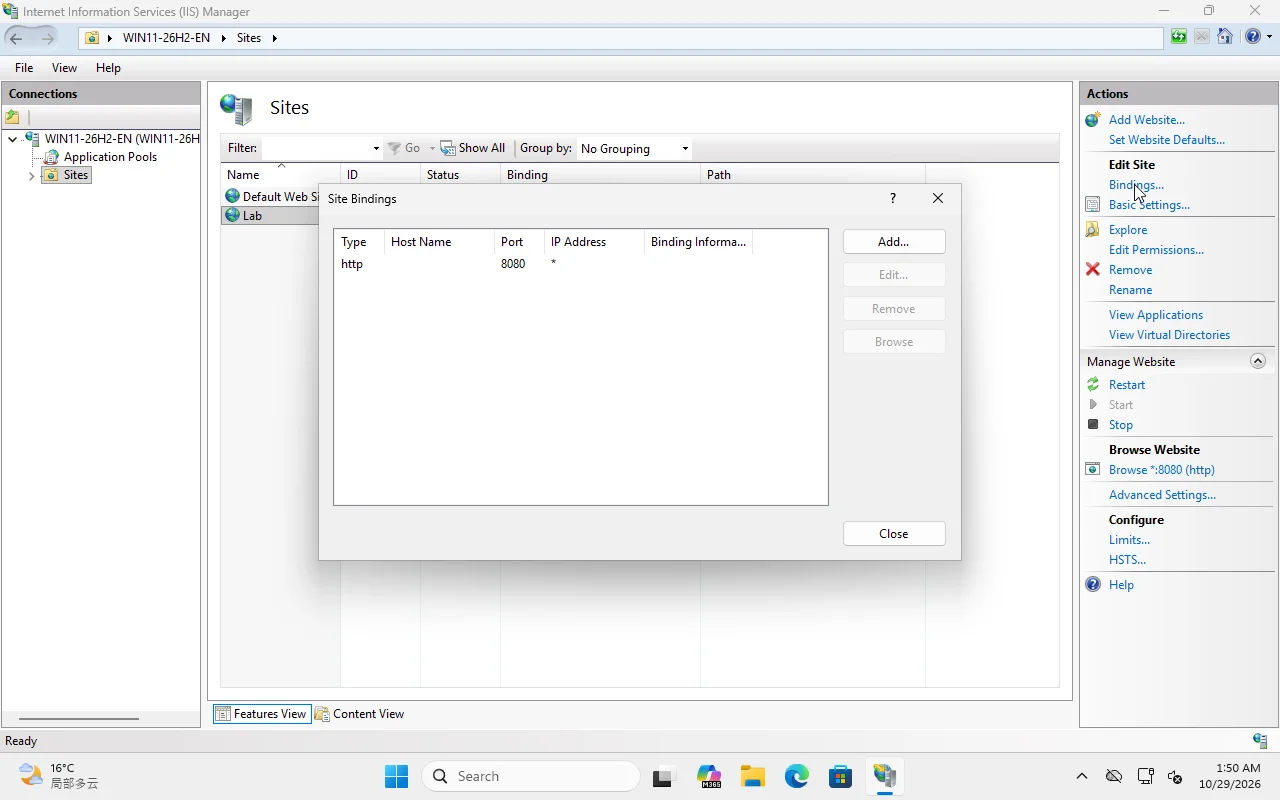
*, no host header. This is the simple lab case; host headers/SNI come next. Windows 11 UI reference; Server 2025 steps E1.The short answer
Section titled “The short answer”An IIS binding is:
protocol IP:port:host-headerhttp *:80:lab.internalhttps *:443:lab.internal + SNI + certificate- IP can be
*(all), a specific address, or a wildcard. - Port distinguishes endpoints, not sites.
- Host header lets many HTTP sites share
*:80. - SNI does the same for HTTPS certificates; without SNI, one IP:port gets one certificate.
Use one site per hostname, not one site per folder. Use applications for paths under a hostname.
HTTP: host headers
Section titled “HTTP: host headers”Import-Module WebAdministrationNew-WebBinding -Name 'Lab' -Protocol http -Port 8081 -HostHeader 'lab.local'Get-WebBinding -Name 'Lab'Test from the server with a Host header:
curl.exe -H "Host: lab.local" http://127.0.0.1:8081/curl http://127.0.0.1:8081/ without the header may hit a different site or return the default site. That is why “it works on localhost but not on the domain” is often a host-header problem.
HTTPS: SNI
Section titled “HTTPS: SNI”Without SNI, IIS binds a certificate to an IP:port. With SNI, the client sends the hostname during the TLS handshake and IIS selects the certificate.
New-WebBinding -Name 'Lab' -Protocol https -Port 443 -HostHeader 'lab.example' -SslFlags 1SslFlags 1 means SNI enabled. Then bind the certificate (hash from Get-ChildItem Cert:\LocalMachine\My):
netsh http add sslcert hostnameport=lab.example:443 ` certhash=<thumbprint> appid={4dc3e181-e14b-4a21-b022-59fc669b0914} ` certstorename=MYUse a hostname:port in netsh for SNI. The appid is an arbitrary GUID IIS uses to identify the binding; keep it consistent per site.
Verify:
netsh http show sslcert hostnameport=lab.example:443curl.exe --resolve lab.example:443:127.0.0.1 https://lab.example/ -k--resolve makes the test hit the local IIS even if public DNS points elsewhere. -k accepts the lab certificate; never use it as a production habit.
Bindings are matched, not guessed
Section titled “Bindings are matched, not guessed”For HTTP, IIS matches protocol/port/IP and then the Host header. If no host header matches, it can fall back to a site bound without a host header (often Default Web Site).
For HTTPS with SNI, the hostname drives certificate selection. A mismatch produces:
- certificate name warning (client sees the wrong name);
- 404 from the wrong site;
- handshake failure if no SNI binding matches.
Common failures
Section titled “Common failures”| Symptom | Likely cause |
|---|---|
| 400 Bad Request | Duplicate/invalid binding; host header malformed |
| 404 on the domain, 200 on localhost | Request hits Default Web Site |
| Certificate name mismatch | Certificate SAN does not include the hostname |
| “Cannot create a file when that file already exists” | Duplicate binding on the same IP:port:host |
| HTTPS works on one site only | No SNI / one certificate per IP:port |
| Works internally, fails externally | DNS/firewall/NAT, not IIS |
Checklist
Section titled “Checklist”- One site per hostname; one app pool per isolation boundary.
- HTTP and HTTPS bindings use the same hostname.
- Certificate SAN covers every name on that binding.
- Default Web Site is stopped or intentionally bound.
- Test with Host header/
--resolve, not onlylocalhost. - Document every IP:port:host and certificate thumbprint.
Lab boundary
Section titled “Lab boundary”The screenshot is Windows 11 26H2, HTTP only, port 8080. HTTPS/SNI and Server 2025 role behavior are E1 until a Server 2025 VM and certificate lab are available.